It is the 9th and you cannot remember whether the electricity bill went out. So you open the bank app, scroll, squint, and eventually find it. Two days later you do the same thing for the broadband.
The Monthly Checklist is the fix. A list of everything you have to pay each month, that you tick off as you pay, and that clears itself on the 1st so you never rebuild it.
The part that makes it work
Most bill lists die in month two, because keeping them current is its own chore.
This one does not. Your items stay, the ticks reset on the 1st of every month. You built the list once in April and it is still working in December with no maintenance at all.
Set it up once, use it forever
The list clears itself on the 1st of every month. Your items stay exactly where they are, only the ticks go. That is the whole trick.
Checklist or recurring transactions?
They sound similar and they do different jobs.
Recurring transactions create the actual entries in your books. Rent, EMI, salary, subscriptions. They record money that moved. That is covered in recurring transactions.
The Monthly Checklist is a to-do list of what you must pay. It tracks your intent, not your ledger, and it answers a different question: have I paid everything this month, and what is left over?
Most people use both. The checklist to stay on top of the month, recurring transactions so the money itself gets recorded.
Setting it up
Reach it from More and then Monthly Checklist, or tap Bills on the home screen.
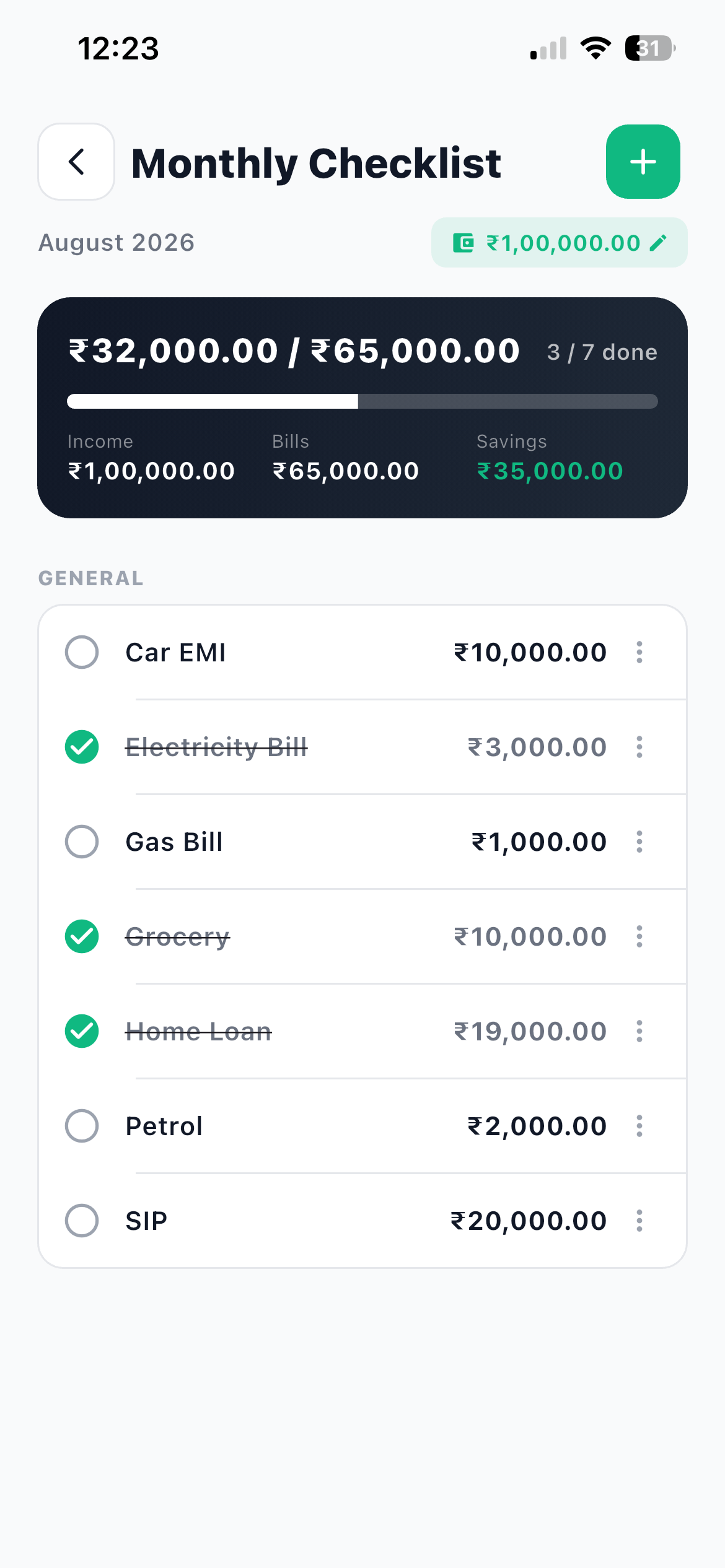
- Open the checklist The current month is shown at the top.
- Tap Set income Enter your Monthly Income and tap Save. This is what makes the savings figure meaningful.
- Add your first item Tap +, or Add first item if the list is empty.
- Fill in the item Give it an Item name such as Electricity, an Amount, an optional Note, and an optional Category like Bills, EMI or SIP, which is used to group the list.
- Tap Add, then repeat Work through every recurring obligation you have. Twenty minutes now, and you are done for good.
What belongs on the list
Everything that comes out of your account every month whether you think about it or not.
Rent. Electricity. Water and society maintenance. Broadband and mobile. Every EMI. Your SIPs. Insurance premiums that fall in this month. School fees. The gym. Streaming subscriptions. Domestic help.
If you are unsure whether something belongs, ask whether missing it would cost you money, a late fee, or an awkward conversation. If yes, it goes on the list.
Include your SIPs and insurance
People list what they owe and forget what they invest. Adding SIPs to the checklist means you see investing as a fixed obligation rather than something you get to if there is money left, which is exactly the mental switch that builds savings.
Using it during the month
Tick each item as you pay it. That is the whole ritual.
The header keeps score: how much is ticked out of the total, the item count, and a completion percentage. Three mini stats sit at the top, Income, Bills, and Savings, where savings is what is left once everything on the list is paid.
That savings figure is the number worth looking at. It tells you, on the 2nd of the month, what this month can actually afford, before you plan a trip or say yes to something.
To change an item, long-press it or use the row menu for Edit and Delete.
A rhythm that fits salary day
Try this pattern for one month.
On salary day, open the checklist and read the Savings figure. That is your real spending money for the month.
As you pay each bill, tick it. Ten seconds, no app switching, no scrolling through bank statements.
Around the 25th, open the list and look at what is still unticked. That is your action list for the last week of the month.
On the 1st, everything clears and you start again with the same list.
Keeping the two systems in step
Your checklist says the rent is paid. Your transaction list should have the rent as an actual expense. Two ways to make sure it does.
Log it manually when you pay, which takes four taps, or set the rent up as a recurring transaction so the entry is created for you on its schedule.
Either way, remember the distinction from expense, income, or transfer. A credit card bill payment on your checklist is a transfer in your books, not a fresh expense.
Questions about the Monthly Checklist
Frequently asked questions
Do I have to rebuild the list every month?
No. The list clears itself on the 1st of every month. Your items stay and only the ticks reset.
What does the Savings figure mean?
It is what is left from your monthly income once everything on your checklist is paid. It is a plan for the month, not a record of what you actually saved.
Does ticking an item create a transaction?
No. The checklist tracks what you need to pay. Your transactions are recorded separately, either manually or through recurring transactions.
Can I group items?
Yes. Give each item an optional Category such as Bills, EMI or SIP, and the list groups by it.
Does the checklist work offline?
Yes, including ticking items. Changes save on your phone immediately and sync when you are back online.
What to do next
Open More and then Monthly Checklist, set your income, and add five items. Not twenty, five. The ones you would be annoyed to miss.
Add the rest as they come up during the month. By the 1st you will have a complete list that maintains itself. Then set the fixed ones up as recurring transactions so the entries get recorded too, or follow the 30-day plan to phase it all in.